
Programmable link infrastructure with AI-powered traffic intelligence.
A nightly AI engine reads every click and surfaces anomalies, opportunities, and recommendations — on top of everything a URL shortener should be: branded short links, smart routing, QR codes, custom domains, and real click analytics.
No credit card required · 25 links/mo on the free plan
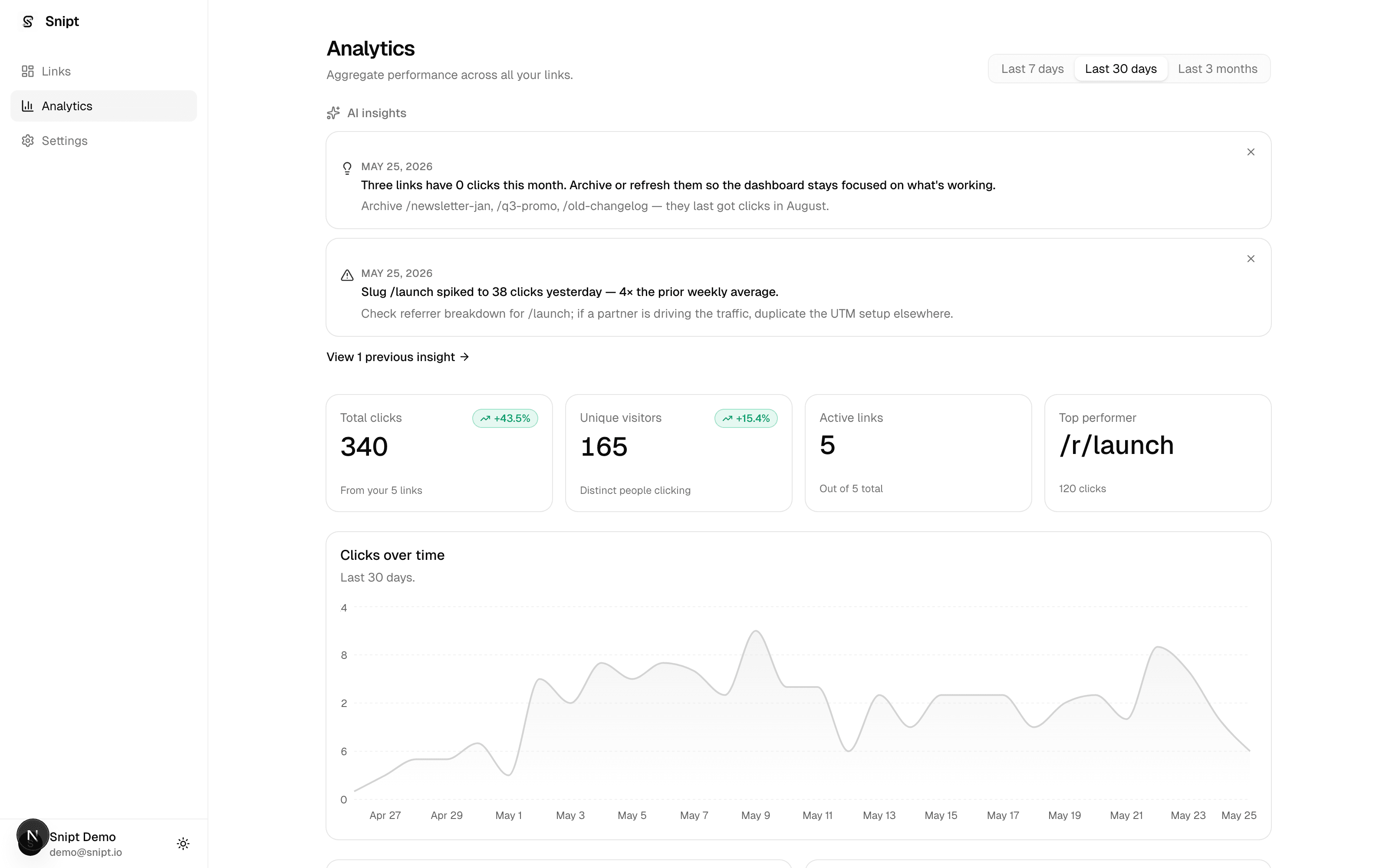
An AI engine on every click.
We don't compete with Bitly on shorter URLs. We compete on what the AI tells you about every click after it.
AI traffic intelligence
A nightly LLM-backed engine reads every click and surfaces anomalies, opportunities, and recommendations. Skip the chart-staring — Snipt tells you what changed and what to do next.
Smart contextual routing
Same short link, different destination per visitor — by country, device, time, referrer, language, or returning-visitor status. Rules are evaluated at the redirect with a Redis-cached rule list, and every rule firing is stamped on the click row so the AI engine sees which contexts actually convert.
Branded short links + custom domains
Everything a URL shortener should be — `go.acme.com/promo`, per-domain slug uniqueness, QR codes, retention analytics, signed URLs. All on the same data plane the AI engine reads from.
Developer infrastructure
REST API with scoped bearer tokens and OWASP-aligned security (every endpoint mapped to the OWASP API Top 10 with regression tests). Drive link creation, routing rules, and domain reads from CI scripts or your own dashboards.
Read the API docsMost tools tell you. Snipt tells you, does it, and then shows you whether it worked.
Analytics hand you a chart and wish you luck. Snipt closes the loop: it finds the change, makes the change, measures the change — and undoes it if the measurement comes back bad.
- 01
It notices
Every night the engine reads the day's clicks — including which routing rules fired — and writes the anomalies, opportunities and recommendations in plain English.
- 02
It acts
Insight cards carry an Apply button: one click turns “make country = US a first-class audience” into a live routing rule, picked up by the very next redirect. On Growth and up, Autopilot can do it without you.
- 03
It proves it
A week later the Impact Receipt lands on the link: the before window, the after window, and the movement on the metric that matters. Or, if the traffic was too thin to say, it tells you that instead.
- 04
It cleans up after itself
If a receipt on an Autopilot change comes back negative, Snipt deletes its own rule, puts your traffic back where it was, and emails you what it did.
Every change comes back with a receipt.
Apply an insight and Snipt writes it down: what it changed, when, and what the link was doing for the fortnight before. Seven days later it comes back with the after — the before window, the after window, and the movement on the metric that matters.
Receipts are arithmetic over your own daily metrics, not a model's opinion. There is nothing in them to hallucinate.
And here is where we stop.
- Below the floor, you get no number at all. A receipt needs 30 clicks before the change, 30 after it, and a full 7 days. Short of that it says “not enough data yet — 12 of 30clicks since June 3” and shows no percentage. On thin traffic a “+40% lift” is one extra sale, and printing it would be worse than printing nothing.
- A verdict on conversion rate needs 10 conversions. Fewer than that and Snipt judges the change on clicks/day instead — and says so on the card. It never quietly swaps one metric for the other and lets you assume the good one.
- We say “since”, not “because”. A before/after on a live link is observational: seasonality, your campaigns and your own other edits all confound it. Snipt will not tell you a change caused anything. The one exception is a split test, which genuinely randomizes who sees what — and only a split-test receipt is ever described as measured against a control.
Impact Receipts are on every plan, including Free. Gating the proof that a feature you already paid for worked would be a strange way to earn your trust.
What Snipt did
Rule “country is US → /us-landing”
Applied Jun 3
Keeping itconversion rate 2.1% → 2.6% (+22%)312 clicks in the 14 days before · 289 clicks since · observed since the change — not a controlled test
Rule “device is mobile → /app”
Applied Jun 28
Not enough data yet12 of 30 clicks since Jun 28No percentage. On traffic this thin a “lift” is one extra sale wearing a suit, so Snipt won't print one.
An illustration of the format, with invented numbers. Impact Receipts went live this week and each one needs a full 7days of traffic after the change, so we have no results of our own to show you yet — and we're not going to borrow anyone else's.
It makes the change. If it was wrong, it takes it back.
Turn Autopilot on for a link and Snipt stops waiting for you to press Apply. When the nightly engine finds a routing opportunity it has the evidence for, it creates the rule itself, emails you what it did, and logs it. A week later the receipt lands — and if the numbers went the wrong way, Snipt deletes its own rule and tells you. You never have to catch it.
Software that changes your live traffic has to earn it. The guardrails:
- Off by default, on every link. You turn it on per link — never per account.
- It can only ever create a routing rule. It never rewrites your destination URL, never starts a split test, and never edits or deletes anything you made by hand.
- Your rules outrank it. An Autopilot rule is always evaluated last, so a rule you wrote can never be preempted by one the machine wrote.
- One outstanding bet per link. It won't touch a link again until its last change has been measured — two overlapping changes would destroy the attribution of both.
- It stands down when you're working. A rule you wrote by hand in the last week tells Snipt you're tuning this link; it stays out of your way.
- Every action is announced. A webhook fires unconditionally and an email goes out (on by default, and you can turn it off) — an autonomous change you don't hear about is indistinguishable from a bug.
- “Keep it” is final. Press it on a change and no rollback may ever touch it again — you may know something the numbers don't.
- It only reverts its own work. A rule you applied yourself is never auto-undone, however bad its numbers; you get a receipt recommending you remove it, and the decision stays yours.
The jobs that run while you are not looking.
A link you set up six months ago is the one most likely to be quietly broken. Snipt checks.
Link-rot watch
A nightly probe checks the destinations of links people are actually clicking. One failure is a blip, so nothing happens; a second consecutive failure badges the link Broken, writes a high-priority insight, and emails you. It won't page you for a 401 or a 429 — a gated page isn't a dead one.
Every plan, including FreeScheduled links + a fallback URL
Give a link an activation date, an expiry date, or both. Set a fallback URL and traffic arriving after the campaign ends lands somewhere useful instead of a dead end — and the click is still logged, so you can see what's still out there pointing at you.
Core and upSplit tests that finish themselves
Point a link at up to 3 destinations (4 on Premium). Visitors are split deterministically, the conversion beacon on your page reports what worked, and each night the optimizer shifts traffic toward the winner — refusing to move on thin data. When one variant clearly wins, the test completes itself. Your link's own destination is never rewritten behind your back.
Growth and upWho gets what
Full pricing- Impact Receipts
- Every plan, including Free
- Link-rot watch
- Every plan, including Free
- AI insights
- 1/week on Free · 8 on Core · 30 on Growth · 250 on Premium
- Routing rules (per link)
- 1 on Free · 2 on Core · 10 on Growth · 100 on Premium
- Custom domains
- 1 on Core · 5 on Growth · 75 on Premium
- Conversion + revenue tracking
- Core and up
- Expiry, scheduling + fallback URL
- Core and up
- Split testing
- Growth (3 variants) · Premium (4)
- Autopilot
- Growth (3 unattended actions a week) · Premium (10)
All of it shipped in the last few releases. Read the changelog for the full record, or see why we built it this way.
Ready to take your links seriously?
25 free links a month, unlimited clicks on every one. No card. No nonsense.